What Is a Barcode and How Does It Work?
Created on 25 June, 2026 • generate barcode • 233 views • 8 minutes read
What is a barcode and how does it work? Learn how barcodes encode data, the most common types (EAN, UPC, Code 128), and how to create one for your product.
You've seen barcodes on almost everything you've ever bought — on cereal boxes, shipping labels, prescription bottles, and library books. But most people have never stopped to think about what that pattern of lines actually is, or how scanning it in a fraction of a second can pull up a product name, price, and inventory count from a database thousands of miles away.
In this guide, you'll learn exactly what a barcode is, how it works, the most common types used today, and how to create one for your own product or business in minutes.
What Is a Barcode?
A barcode is a visual representation of data — typically a number — encoded into a pattern of parallel lines, bars, or geometric shapes that a scanner or camera can read optically. The pattern translates directly into a string of digits or characters that a computer system can look up in a database to retrieve information about the item it's attached to.
The barcode itself doesn't store product names, prices, or descriptions. It stores only an identifier — a unique number assigned to that product or item. The real information lives in the database on the other side, linked to that number. When a cashier scans a barcode at checkout, the scanner reads the number, sends it to the store's system, and the system returns the product name and price in milliseconds.
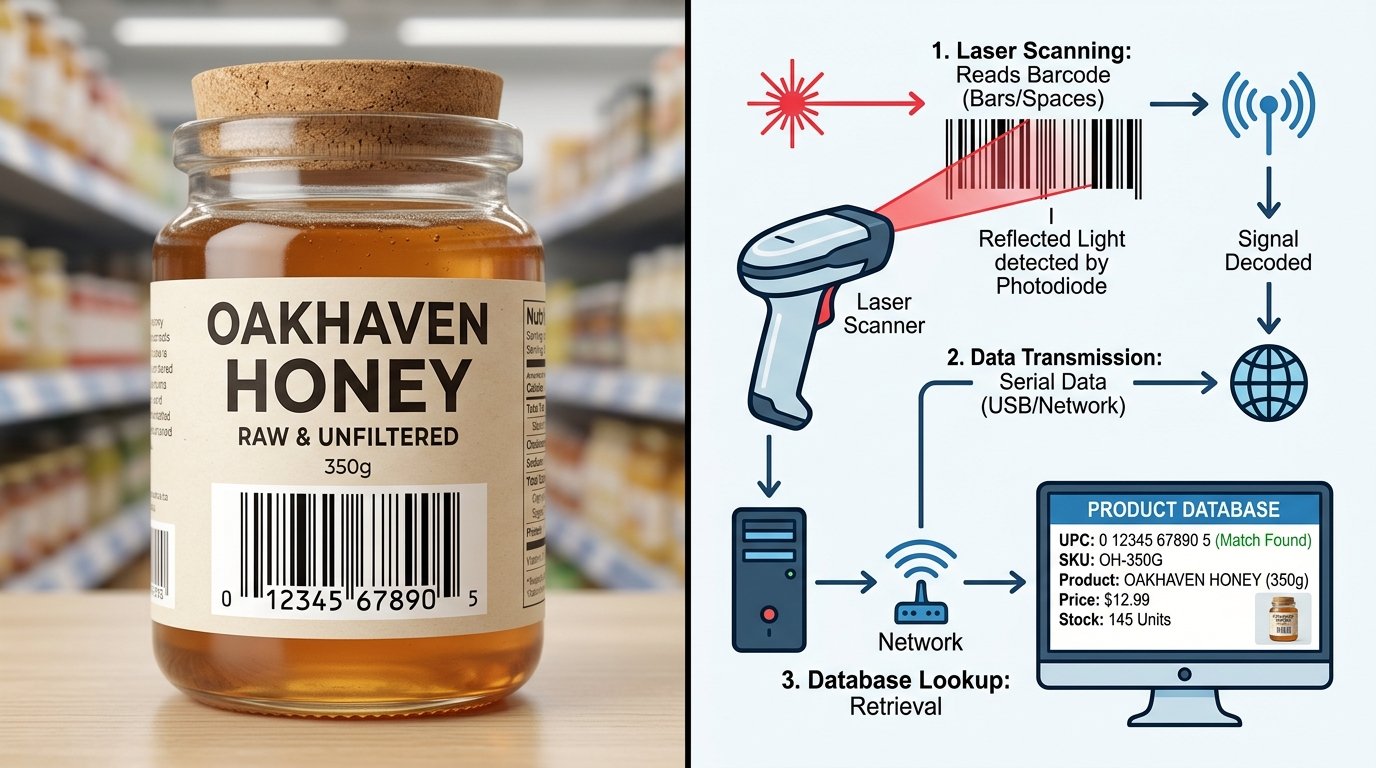
Image suggestion: a close-up of a standard EAN-13 barcode on a product label with the 13-digit number visible beneath the bars — alt text: "what is a barcode and how does it work"
How Does a Barcode Work?
A barcode works through a process of optical reading and database lookup. Here's how it happens, step by step:
1. Encoding the data When a barcode is created, a number (or string of characters) is converted into a visual pattern according to a specific barcode standard. Each digit maps to a unique sequence of wide and narrow bars and spaces. The width and arrangement of these bars represent binary data — the scanner reads them as a series of ones and zeros.
2. Scanning the barcode A barcode scanner or smartphone camera illuminates the barcode with a beam of light (laser or LED). Dark bars absorb the light; white spaces reflect it back. A sensor in the scanner detects this pattern of light and dark, converts it into an electrical signal, and decodes it into the original number.
3. Looking up the database The decoded number is sent to a connected system — a point-of-sale terminal, inventory management software, or warehouse database. The system matches the number to a record and returns whatever information is linked to it: product name, price, stock level, expiry date, location, or anything else stored against that identifier.
The entire process — from scan to result — typically takes less than a quarter of a second.
Types of Barcodes
Not all barcodes are the same. Different industries and use cases use different barcode formats, each optimized for a specific purpose.
1D Barcodes (Linear Barcodes)
Traditional barcodes encode data horizontally in a single row of bars and spaces. These are the most widely recognized format and are used in retail, logistics, healthcare, and manufacturing.
EAN-13 The global standard for retail products. Used across Europe, Asia, Australia, and most of the world outside North America. Contains 13 digits including a country prefix. Accepted by Amazon and most international retailers.
UPC-A The North American retail standard. Contains 12 digits and is required by major US retailers including Walmart, Target, and Amazon US. For a full comparison of EAN and UPC, see our guide on UPC vs EAN Barcode: What's the Difference?.
Code 128 A high-density barcode that can encode letters, numbers, and symbols. Widely used in shipping labels, logistics, and inventory management. Supports the full ASCII character set.
Code 39 One of the oldest barcode formats. Encodes uppercase letters, numbers, and a handful of special characters. Used in manufacturing, military, and automotive industries.
ITF-14 Used for outer cartons and shipping containers. Encodes 14 digits and is designed to be readable even on rough or corrugated cardboard surfaces. Standard in supply chain and logistics.
Codabar Used in libraries, blood banks, and FedEx air bills. Encodes numeric data and a few special characters. Designed for reliable scanning without a connected computer system.
MSI Plessey Used primarily in inventory control and warehouse shelving. Encodes numeric data with a built-in check digit for error detection.
POSTNET / PLANET Used by the United States Postal Service for mail routing and sorting automation.
2D Barcodes
2D barcodes encode data in two dimensions — both horizontally and vertically — allowing them to store far more information than a 1D barcode in a smaller space. They can encode full URLs, contact details, payment data, and more.
QR Code The most widely recognized 2D barcode. Can encode URLs, text, contact information, WiFi credentials, payment links, and more. Readable by any smartphone camera. Used in marketing, payments, menus, and product packaging worldwide.
EAN-8 A compact version of EAN-13 for small packaging where a full-size barcode won't fit. Contains 8 digits.
DataMatrix Used in electronics manufacturing and pharmaceutical labeling. Can encode large amounts of data in a very small space and remains readable even when partially damaged.
How to Create a Barcode
Creating a barcode for your product or business takes just a few minutes once you have the right number.
Step 1: Get a Valid Barcode Number
For retail use, barcode numbers must be registered through GS1 — the global standards body that manages barcode numbering. Visit gs1.org to register and obtain a Company Prefix, from which you generate your own GTINs (Global Trade Item Numbers).
Each unique product variant — different size, color, or configuration — needs its own unique barcode number.
For internal use, warehouse labeling, or non-retail applications, you can use any number sequence without GS1 registration.
Step 2: Choose the Right Barcode Format
- Selling in the US or Canada → UPC-A
- Selling internationally or in Europe → EAN-13
- Shipping and logistics → Code 128 or ITF-14
- Small packaging → EAN-8 or UPC-E
- Internal inventory → Code 39 or Code 128
For a detailed comparison of UPC and EAN, see our guide on UPC vs EAN Barcode: What's the Difference?.
Step 3: Generate and Test the Barcode
Go to Toolxa's free Barcode Generator, enter your number, select your barcode type, and download a high-resolution PNG or SVG file ready for print.
Before applying the barcode to packaging, test it with a retail-grade barcode scanner or a scanning app on a smartphone. Confirm it reads correctly and returns the expected number.
Common Mistakes to Avoid
- Using unregistered numbers for retail products. Numbers not issued through GS1 can duplicate numbers already used by other brands, causing checkout and inventory errors.
- Choosing the wrong barcode format. A UPC-A barcode on a product for the European market may cause scanning issues at some retailers — confirm the required format with your distributor or retailer.
- Printing the barcode too small. Below the minimum recommended size, barcodes scan inconsistently — especially on curved or textured packaging.
- Low contrast between bars and background. Barcodes must have high contrast (typically black bars on white background) to scan reliably. Avoid printing on colored or patterned backgrounds.
- Using the same barcode for multiple product variants. Each distinct variant needs its own unique number. Reusing a barcode across sizes or colors causes inventory and checkout errors.
Best Practices
- Register through GS1 if you're selling in retail — it's the only way to guarantee your numbers are globally unique.
- Download barcodes in vector format (SVG or EPS) for print — vector files scale without losing quality.
- Always include the human-readable number below the barcode so it can be entered manually if scanning fails.
- Test before you print — always scan a proof before committing to a full packaging run.
- Keep a product-to-barcode registry — a spreadsheet mapping every product variant to its unique GTIN and barcode image file is essential as you scale.
- Place barcodes on flat surfaces — avoid curved, heavily textured, or reflective areas where scanning reliability drops.
FAQs
What is the difference between a barcode and a QR code?
A traditional barcode (1D) encodes data in a single row of parallel bars and can typically store 8–25 characters. A QR code (2D) encodes data in a grid pattern and can store hundreds of characters including URLs, contact details, and payment information. QR codes are read by smartphone cameras; traditional barcodes are typically read by dedicated scanners or laser guns at retail checkouts.
Do I need a barcode to sell on Amazon?
Yes. Amazon requires a valid GTIN — typically a UPC or EAN — for most product listings. You must obtain barcodes from GS1 or an authorized reseller. Amazon cross-checks GTINs against the GS1 database, so unregistered numbers will be rejected.
How many digits does a barcode have?
It depends on the format. EAN-13 has 13 digits. UPC-A has 12. EAN-8 has 8. ITF-14 has 14. Code 128 and Code 39 are variable-length and can encode letters and numbers as well as digits.
Can a barcode store product information like price or description?
No. A barcode stores only an identifier number. The product name, price, description, and other details are stored in a separate database and retrieved when the barcode number is looked up. This is why the same product can have a different price at different stores — the barcode is the same, but each store's database has its own price record.
What is a GTIN?
GTIN stands for Global Trade Item Number. It is the standardized number that uniquely identifies a product globally. UPC-A numbers are GTINs (GTIN-12), and EAN-13 numbers are also GTINs (GTIN-13). The GTIN is the data; the barcode is the visual format used to encode and scan it.
Are barcodes still relevant in 2026?
Yes. Despite the rise of QR codes and RFID, traditional barcodes remain the global standard for retail checkout and supply chain management. Billions of products are scanned at retail checkouts every day using 1D barcodes. QR codes complement rather than replace them — they serve different use cases and audiences.
Final Thoughts
A barcode is one of the most quietly powerful technologies in everyday life — a simple pattern of lines that connects a physical object to a global database in a fraction of a second. Understanding how they work, which format to use, and how to create one correctly is essential knowledge for anyone selling physical products, managing inventory, or working in logistics.
Ready to create a barcode for your product? Use Toolxa's free barcode generator to build a print-ready UPC, EAN, Code 128, or any other barcode format in seconds — no sign-up required.