How to Create Short Links for Marketing Campaigns in 2026
Created on 19 June, 2026 • Short links • 156 views • 8 minutes read
Learn how to create short links for marketing campaigns in minutes. Step-by-step guide, channel tracking tips, common mistakes, and FAQs for marketers.
Long, cluttered URLs don't belong in marketing campaigns. A link like yourdomain.com/campaign?utm_source=email&utm_medium=newsletter&utm_campaign=summer-sale-2026 tells the reader nothing and looks unprofessional — especially in print, on social media, or inside an SMS message. A short link fixes all of that in one step.
In this guide, you'll learn what short links are, why marketing teams rely on them, how to create one in minutes, and how to use them strategically across your campaigns. We'll also cover the most common mistakes marketers make with short links and how to avoid them.
What Is a Short Link?
A short link is a condensed URL that redirects to a longer destination address. Instead of sharing a full URL with tracking parameters, folder paths, and query strings, you share something clean and readable — like toolxa.co/summer26 — that takes people to the same place.
Behind the scenes, a URL shortener service stores the mapping between your short link and its destination. When someone clicks or taps the short link, the service redirects them to the full URL in a fraction of a second, invisibly and automatically.
Short links can be:
- Generic — randomly generated slugs like bit.ly/3xKp29m
- Branded — using your own domain, like toolxa.co/summer26
- Tracked — recording clicks, locations, devices, and referral sources
- Dynamic — allowing you to update the destination without changing the link itself
For marketing purposes, branded and tracked short links are almost always the better choice.
Image suggestion: a before-and-after showing a long URL with UTM parameters vs a clean branded short link — alt text: "short link for marketing campaigns"
Benefits of Using Short Links for Marketing Campaigns
Short links do more than save characters. Used well, they become a lightweight analytics layer across every channel you run.
- Cleaner, more clickable links. A short, readable link performs better in emails, social posts, and SMS messages. People are more likely to click a link they can read and trust than a long string of characters.
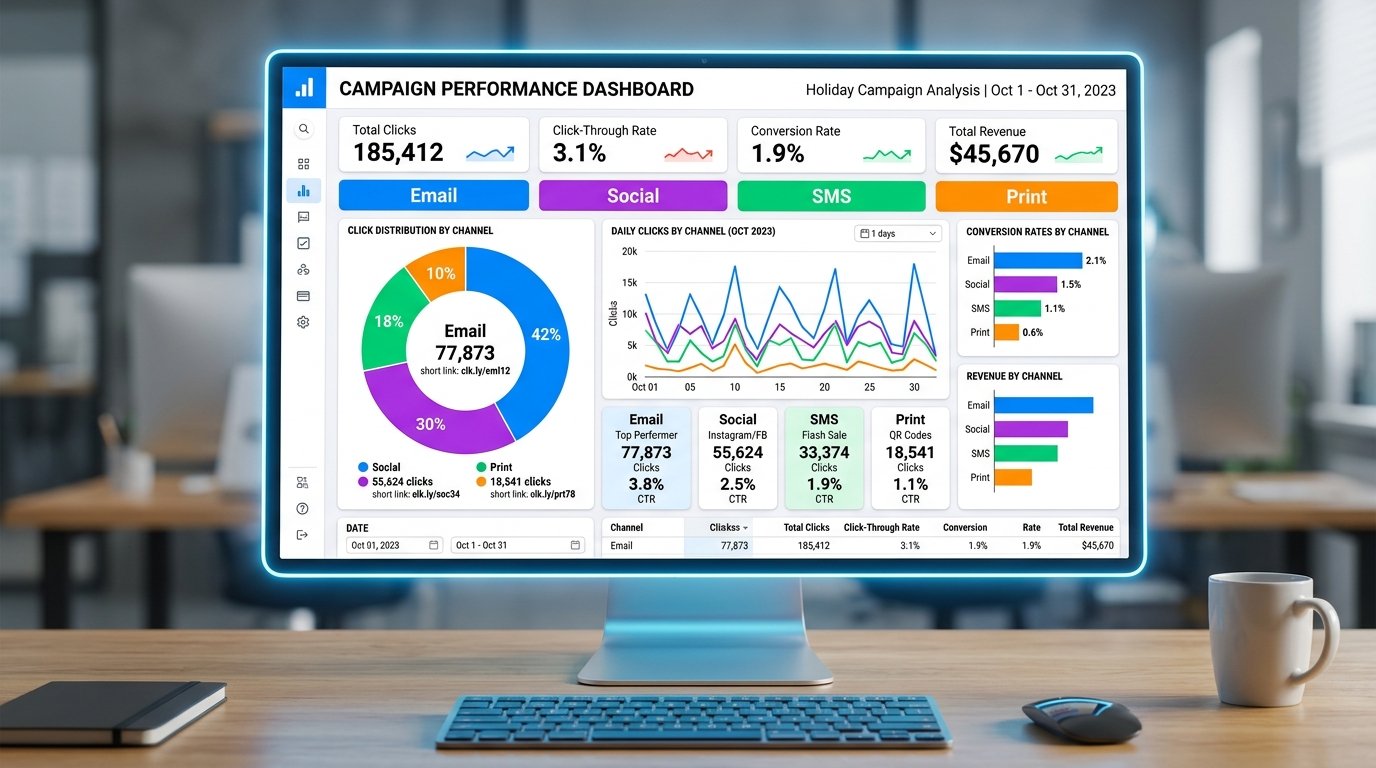
- Click tracking and analytics. Every scan or click on a short link can be tracked — total clicks, unique visitors, geographic location, device type, and referral source — giving you real data on which channels and creatives are driving traffic.
- Channel attribution. By creating a separate short link for each channel (one for email, one for Instagram, one for a flyer), you can see exactly which marketing touchpoint is generating results, without needing complex UTM setups.
- Branded trust. A link using your own domain (yourbrand.co/sale) signals legitimacy and increases click-through rates compared to anonymous third-party shorteners.
- Easy to update. If your destination page changes mid-campaign, a dynamic short link lets you redirect traffic to the new page instantly — without updating every piece of content where the link appeared.
- Print-friendly. Short links can be typed by hand or paired with a QR code for offline materials like flyers, posters, and business cards. For more on combining the two, see our guide on QR Codes for Business Cards.
How to Create Short Links for Marketing Campaigns
Creating a short link for a campaign takes just a few minutes and pays off across every channel you use it on.
Step 1: Define the Campaign Goal and Destination
Before shortening anything, confirm the full destination URL — the actual page you want people to land on. Make sure the landing page is live, mobile-optimized, and matches the promise of the campaign creative.
If you're running multiple campaigns or testing different audiences, plan one destination URL per variation. Each unique destination should get its own short link, so you can track performance separately.
If you'd like to add UTM parameters to your destination URL before shortening (to track campaign data in Google Analytics), build that full UTM URL first, then shorten it. The short link hides the parameters from the viewer while still passing them through to your analytics.
Step 2: Create the Short Link
Go to a free short link tool such as Toolxa's URL Shortener, paste your destination URL, and generate the short link. At this step:
- Choose a custom slug if available — something readable and campaign-relevant like /summer26 or /free-trial is far more professional than a random string.
- Use a branded domain if your tool supports it — links using your own domain build more trust than generic shortener domains.
- Enable click tracking so you can monitor performance from the dashboard.
If you're running multiple channel versions of the same campaign, create a separate short link for each (email, social, print, SMS) so you can compare performance by channel.
Step 3: Test, Deploy, and Monitor
Before launching, click every short link yourself to confirm it redirects to the correct destination on both desktop and mobile. If you're using the links in print materials, also test that they're easy to type and that the slug doesn't contain easily confused characters like l (lowercase L) and 1, or O and 0.
Once deployed, check your analytics dashboard regularly during the campaign. Look for:
- Total clicks and unique visitors
- Click trends over time (to identify which sends or posts drove spikes)
- Top-performing channels (to reallocate budget or effort mid-campaign)
- Geographic and device breakdown (to spot unexpected audiences)
Common Mistakes to Avoid
Short links are simple in principle, but a few common errors quietly undermine campaign results.
- Using one link across all channels. If every channel uses the same short link, you can see total clicks but can't tell which channel generated them. Create a separate link per channel from the start.
- Using a generic, unbranded shortener for professional campaigns. Links from anonymous third-party shorteners can trigger spam filters in email clients and look suspicious to recipients — especially for B2B audiences.
- Linking to a page that isn't mobile-optimized. The majority of clicks on short links in social and SMS campaigns come from mobile devices. A desktop-only landing page is a conversion killer.
- Not testing before launch. A broken or mis-targeted short link in a campaign that's already sent is difficult or impossible to fix if you used a static link — always test before distributing.
- Forgetting to add UTM parameters to the destination URL. Short links handle channel tracking within their own dashboard, but UTM parameters are what pass campaign data through to Google Analytics. Both serve different purposes and work best together.
- Letting the short link service account lapse mid-campaign. If you're using a paid short link service and your subscription expires, all your dynamic links go offline — mid-campaign.
Best Practices
To get the most from short links across your marketing campaigns, keep these principles in mind.
- Create a naming convention for slugs. Something like /[campaign]-[channel]-[year] (e.g., /summer-email-26) keeps your dashboard organized when you're running multiple campaigns simultaneously.
- One short link per channel per campaign. Email, Instagram, LinkedIn, SMS, print — each gets its own link so attribution is clean.
- Pair short links with QR codes for offline campaigns. A short link and a QR code pointing to the same destination give your audience two ways to reach you from a single piece of print. See our guide on WiFi QR Codes for Guests for a related example of combining formats.
- Monitor the first 48 hours closely. Most campaign traffic spikes early. Catching a broken link or wrong destination in the first few hours minimizes damage.
- Archive, don't delete. After a campaign ends, keep old short links live and redirect them to a relevant current page rather than deleting them — broken links in old social posts and emails are a poor brand experience.
- Use dynamic links for anything in print. Printed materials can't be recalled once distributed. A dynamic short link lets you change the destination if plans change, without the printed link ever becoming outdated.
FAQs
Are short links free to create?
Yes. Basic short link creation is free with most tools, including Toolxa. Advanced features like branded domains, detailed analytics, and dynamic redirects may require a paid plan depending on the service.
What is the difference between a short link and a QR code?
A short link is a clickable URL — it works in digital channels like email, social media, and SMS. A QR code is a scannable image — it works in print and offline contexts. Both can point to the same destination, and using them together gives your audience two ways to access the same campaign page. See our QR Code for Business Cards guide for how to combine the two effectively.
Can I track who clicked my short link?
You can track aggregate click data — total clicks, unique visitors, location, device type, and time of click. Short link tools do not identify individual users by name or email address.
Do short links hurt SEO?
Short links redirect using a 301 (permanent) or 302 (temporary) redirect. Most search engines handle these redirects correctly and pass link equity through to the destination. For SEO-critical links (like those you're building backlinks from), use your actual destination URL rather than a short link.
Can I change where a short link redirects to?
Yes, if it's a dynamic short link. You can update the destination URL from your dashboard at any time without changing the short link itself. Static short links cannot be edited after creation.
How long do short links last?
A short link stays active as long as your account with the service is active. See our full guide on How Long Do QR Codes Last for a detailed breakdown of link and code lifespan — the same principles apply to short links.
Final Thoughts
Short links are one of the simplest, highest-return tools in a marketer's toolkit. They make your campaigns look more professional, give you real attribution data across channels, and keep your links manageable across email, social, SMS, and print — all at the same time.
The key is to use them with intention: one link per channel, a clean branded slug, click tracking enabled, and a mobile-optimized destination waiting on the other side.
Ready to create your first campaign short link? Use Toolxa's free URL shortener to build a clean, trackable short link in seconds — no sign-up required.