QR Code Size Guide: What Size Should a QR Code Be?
Created on 28 June, 2026 • qr code • 366 views • 9 minutes read
QR code size guide for 2026 — minimum sizes for print and digital, the 10:1 scanning distance rule, DPI requirements, quiet zone specs, and best practices by use case.
You designed a QR code, added it to your flyer, printed 500 copies, and distributed them — only to find out nobody can scan it. The code is too small, the resolution is too low, or the scanning distance was never factored in. This is one of the most common and costly QR code mistakes, and it's entirely preventable.
In this guide, you'll learn the exact minimum QR code size for every use case — business cards, flyers, posters, menus, packaging, and billboards — plus the scanning distance formula, DPI requirements, file format recommendations, and the quiet zone rules that most people overlook entirely.
What Is the Minimum QR Code Size?
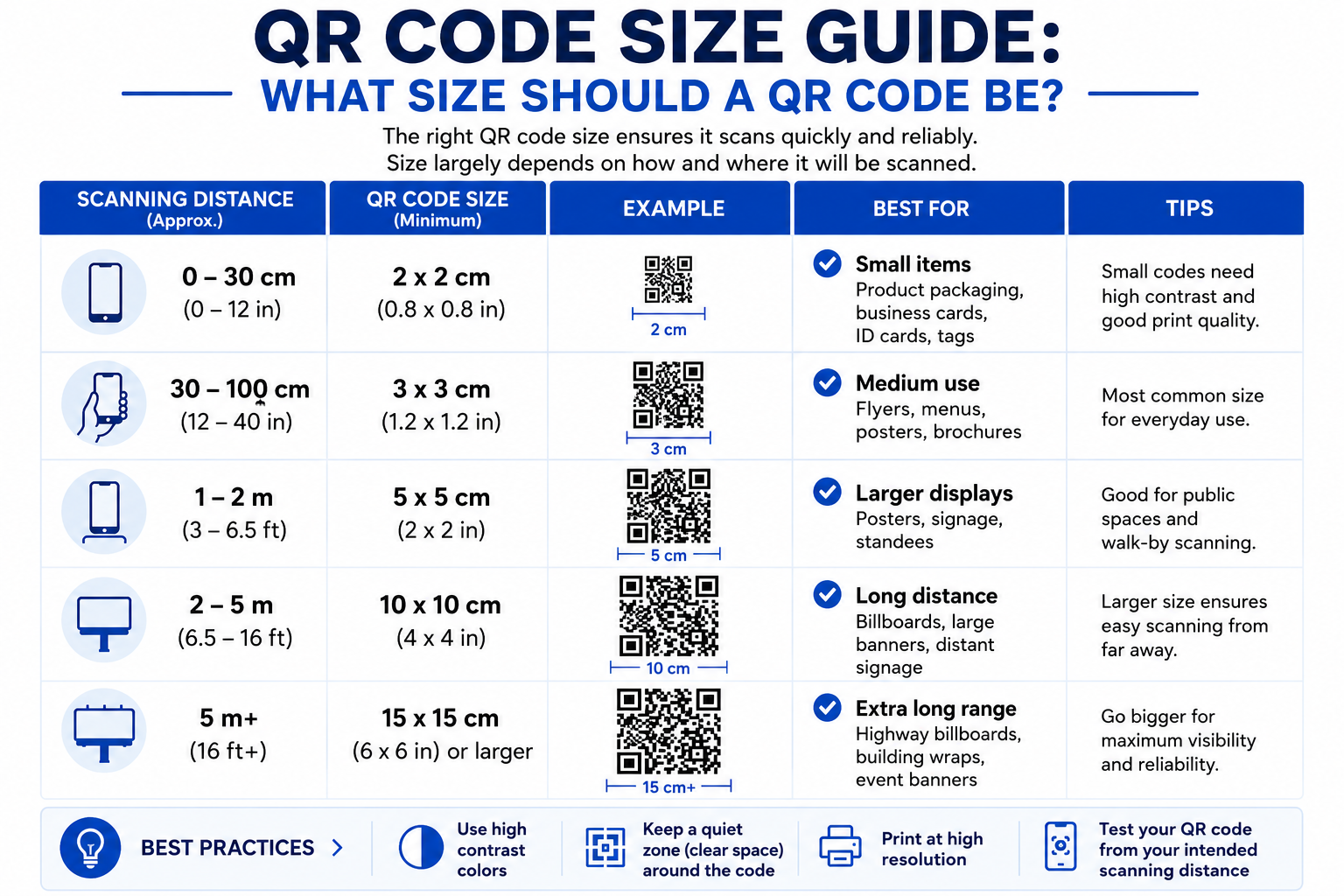
The minimum recommended QR code size is 2 × 2 cm (approximately 0.8 × 0.8 inches). Below this, scanning becomes unreliable for most smartphones at a typical arm's length.
In theory, a QR code can be as small as 1 × 1 cm and still scan under perfect conditions — ideal lighting, a close-range scan, a recent high-end smartphone, and a short URL encoded. In practice, designing for that minimum is a risk. Lighting changes, surface textures, older cameras, and scanning angles all eat into your margin.
The absolute minimum recommended size for a QR code is 2 cm × 2 cm (0.8 in × 0.8 in) when scanned at close range. For business cards or materials scanned at arm's length, 3 cm × 3 cm is safer.
Image suggestion: a size comparison graphic showing QR codes at 1cm, 2cm, and 3cm side by side with scan reliability indicators — alt text: "qr code minimum size comparison"
The 10:1 Scanning Distance Rule
The most important formula in QR code sizing is the 10:1 rule: the QR code should be one-tenth the size of the distance from which it will be scanned.
If someone scans the code from 10 inches away, the code needs to be at least 1 inch across. If they will scan it from 10 feet (120 inches) away, the code needs to be at least 12 inches.
Add 20-30% to whatever number the formula gives you to account for real-world variables — poor lighting, motion blur, imperfect scan angles, and older phone cameras.
Quick reference:
Scanning DistanceMinimum QR Code Size20 cm (arm's length)2 cm × 2 cm50 cm5 cm × 5 cm1 meter10 cm × 10 cm2 meters20 cm × 20 cm3 meters30 cm × 30 cm10 meters100 cm × 100 cm
Billboards are generally not suitable for QR codes due to the scanning distance — the code would need to be several meters wide to be reliably scannable from a car or sidewalk.
QR Code Size by Use Case
Business Cards
For a standard paper business card, the sweet spot is 2 × 2 cm (0.8 × 0.8 inches) minimum — but 2.5 cm is recommended if you have the space. That extra half-centimeter gives you a cushion for print variations and makes scanning noticeably faster.
Place the code in a corner with adequate white space around it. For a vCard QR code that lets people save your contact details with one scan, use a dynamic QR code to keep the module density low and the code as compact as possible. For more on QR codes for business cards specifically, see our guide on How to Create a QR Code for Business Cards.
Flyers and Brochures
Recommended size: 3 × 3 cm to 4 × 4 cm
Flyers are typically scanned from 30-50 cm away. A 3 cm code comfortably covers this distance. Position the code where it's naturally visible — near the bottom of the flyer with a clear "Scan to..." prompt rather than buried in a corner.
Restaurant Menus and Table Cards
Recommended size: 4 × 4 cm to 6 × 6 cm
Table cards are scanned from about 40-60 cm while seated. A WiFi QR code or QR code menu placed on a table tent should be at least 4 cm to scan reliably across all customers' phones. Use high-contrast black on white — avoid printing on colored or patterned backgrounds.
Product Packaging and Labels
Recommended size: 2 × 2 cm minimum — larger for curved surfaces
Curved surfaces like bottles and cans distort the QR modules, making the code harder to scan. For any curved packaging, add at least 20% to the base size and always test the printed version before committing to a production run. A URL QR code or EPC payment QR on packaging should use Level M or higher error correction.
Posters and Signage
Recommended size: 8 × 8 cm to 15 × 15 cm
Posters are typically scanned from 1-1.5 meters away. Apply the 10:1 rule: a poster scanned from 1 meter needs a minimum 10 cm code. For a location QR code directing customers to your store, or a Google Reviews QR code on a storefront sign, 10-12 cm is a safe target.
Email Signatures
Recommended size: 150 × 150 pixels minimum on screen
Email signatures are typically clicked rather than scanned from a phone, so the pixel dimension matters more than physical size. Screens are forgiving because they're backlit, but go below 150 px and older displays make it unreadable. A WhatsApp QR code or vCard QR in an email signature should be exported as a PNG at 300 × 300 px minimum.
Digital Screens and Presentations
Recommended size: 200 × 200 pixels minimum
For screens, resolution matters more than physical dimensions. A code that looks fine on a laptop screen may blur on a projector. Always export at the highest resolution available and test on the actual display before the presentation.
DPI Requirements for Print
DPI (dots per inch) determines how sharp your QR code appears in print. A blurry QR code fails to scan even if it's the right physical size.
Print Use CaseRecommended DPIBusiness cards, brochures, menus300 DPIPosters, banners (viewed from 1m+)150 DPILarge format (viewed from 5m+)72 DPI
Never use JPEG for QR codes. JPEG compression introduces artifacts — slight color bleeds and blurring around the sharp edges of modules. On a small code, those artifacts can make individual modules unreadable.
Use SVG or EPS for print (vector formats that scale without quality loss) and PNG for digital use. When you generate a QR code on Toolxa, download it as SVG for print and PNG for digital use.
The Quiet Zone: The Rule Most People Ignore
The quiet zone is the white border of empty space surrounding the QR code pattern. It is not decorative — it tells the scanner where the code begins and ends. Without it, scan failure rates increase significantly.
Minimum quiet zone: 4 modules wide on all four sides. What's a module? The smallest square unit in the QR code pattern. If your QR code is 1 inch wide with 25 modules across, each module is 0.04 inches, and the quiet zone needs to be at least 0.16 inches on each side.
In practical terms: leave at least 3-4mm of clear white space around your QR code at any printed size. Don't place the code flush against the edge of a label or card, and don't let other design elements bleed into the quiet zone.
Error Correction Levels
QR codes have four error correction levels that determine how much of the pattern can be damaged or obscured while still scanning correctly:
LevelRecovery CapacityBest ForL7%Clean digital displays, short-term useM15%General print — the recommended defaultQ25%Codes with a logo embeddedH30%Outdoor signage, worn surfaces, industrial labels
Higher error correction adds redundancy to the code, which increases module count and density. A QR code at level H will need to be printed larger than the same code at level L.
For a WhatsApp QR code on a business card or a WiFi QR code in a laminated sign, use Level M. For a Google Reviews QR code on an outdoor storefront sign, use Level H.
Static vs Dynamic QR Codes: Size Impact
A long static URL creates a Version 8 code. A dynamic QR code with a short redirect URL produces a Version 3 code — roughly 50% smaller in physical dimensions.
This matters significantly for space-constrained applications like business cards, small product labels, and packaging. A dynamic QR code encodes a short redirect URL regardless of how long your actual destination URL is — so the code stays compact and scans reliably even at smaller sizes.
For more on when to choose static vs dynamic, see our guide on How Long Do QR Codes Last.
Common Mistakes to Avoid
- Designing for the minimum. The 2 cm measurement works under perfect conditions. Add 20-30% to account for real-world variables like lighting, surface texture, and older phone cameras.
- Using JPEG format for print. JPEG compression blurs the sharp module edges that scanners rely on. Always use SVG or PNG.
- Ignoring the quiet zone. Placing a QR code flush against a border or text cuts off the scanner's ability to detect the code boundary.
- Not testing before printing. According to Supercode, 15% of QR code campaigns underperform due entirely to printing issues — blurry resolution, poor contrast, and insufficient size are the top culprits. Always print a test copy at actual size and scan it on multiple phones before the full print run.
- Using the same size for all surfaces. A size that works on matte paper will underperform on glossy stock or curved packaging. Add 20% for curved or reflective surfaces.
- Rotating the QR code. Always keep the code perfectly square and axis-aligned — even a slight rotation disrupts the finder patterns that scanners rely on.
Best Practices
- Always download in SVG for print — vector files scale to any size without losing quality. Toolxa's QR code generator offers SVG and PNG download options.
- Use the 10:1 rule as your starting point, then add 25% for real-world margin.
- Use Level M error correction as the default for most print applications, and Level H for anything that will be handled, folded, or placed outdoors.
- Use a dynamic QR code for any space-constrained application — the shorter redirect URL produces a simpler, more compact code that scans reliably at smaller sizes.
- Test on both iOS and Android before committing to a print run — camera apps differ in how they process artistic or heavily customized QR codes.
- Add a "Scan me" prompt near the code — even at the right size, a label increases scan rates by removing ambiguity about what the code does.
FAQs
What is the minimum QR code size for print?
The reliable minimum for everyday print use is 2 × 2 cm (0.8 × 0.8 inches). For anything beyond close-range scanning, apply the 10:1 rule: the code should be one-tenth the scanning distance.
What size should a QR code be on a business card?
2 × 2 cm is the minimum. 2.5 × 2.5 cm is recommended if the card layout allows. Place it on the back of the card with adequate white space around all four sides.
What DPI should I use for a QR code?
300 DPI for anything printed at close range — business cards, brochures, menus, and packaging. 150 DPI for posters and banners viewed from 1 meter or more. Always export as SVG or PNG, never JPEG.
Does a QR code need a white border?
Yes — this is the quiet zone, and it is a functional requirement. Maintain a minimum of 3-4mm of white space around your QR code at any printed size. Without it, scanners cannot reliably detect where the code begins and ends.
Does more data make a QR code larger?
Yes. More data requires more modules, which means a larger code at the same minimum module size. This is why dynamic QR codes are significantly smaller than static ones encoding a long URL — the dynamic code only encodes a short redirect, not the full destination.
What file format should I use for a QR code?
SVG or EPS for print (infinite scaling, no quality loss). PNG at 300+ pixels for digital use. Never JPEG — compression artifacts blur the module edges and cause scan failures.
Final Thoughts
Getting QR code sizing right is one of the simplest ways to improve scan rates across every material you produce. The rules are straightforward: 2 cm minimum for close-range print, the 10:1 formula for anything beyond arm's length, 300 DPI for professional printing, SVG for scalable output, and a quiet zone on all four sides.
Use a dynamic QR code wherever space is limited — the compact module grid gives you more flexibility without sacrificing reliability. And always test before you print.
Ready to create a correctly sized QR code? Use Toolxa's free QR code generator to generate a high-resolution, print-ready QR code in SVG and PNG — no sign-up required.