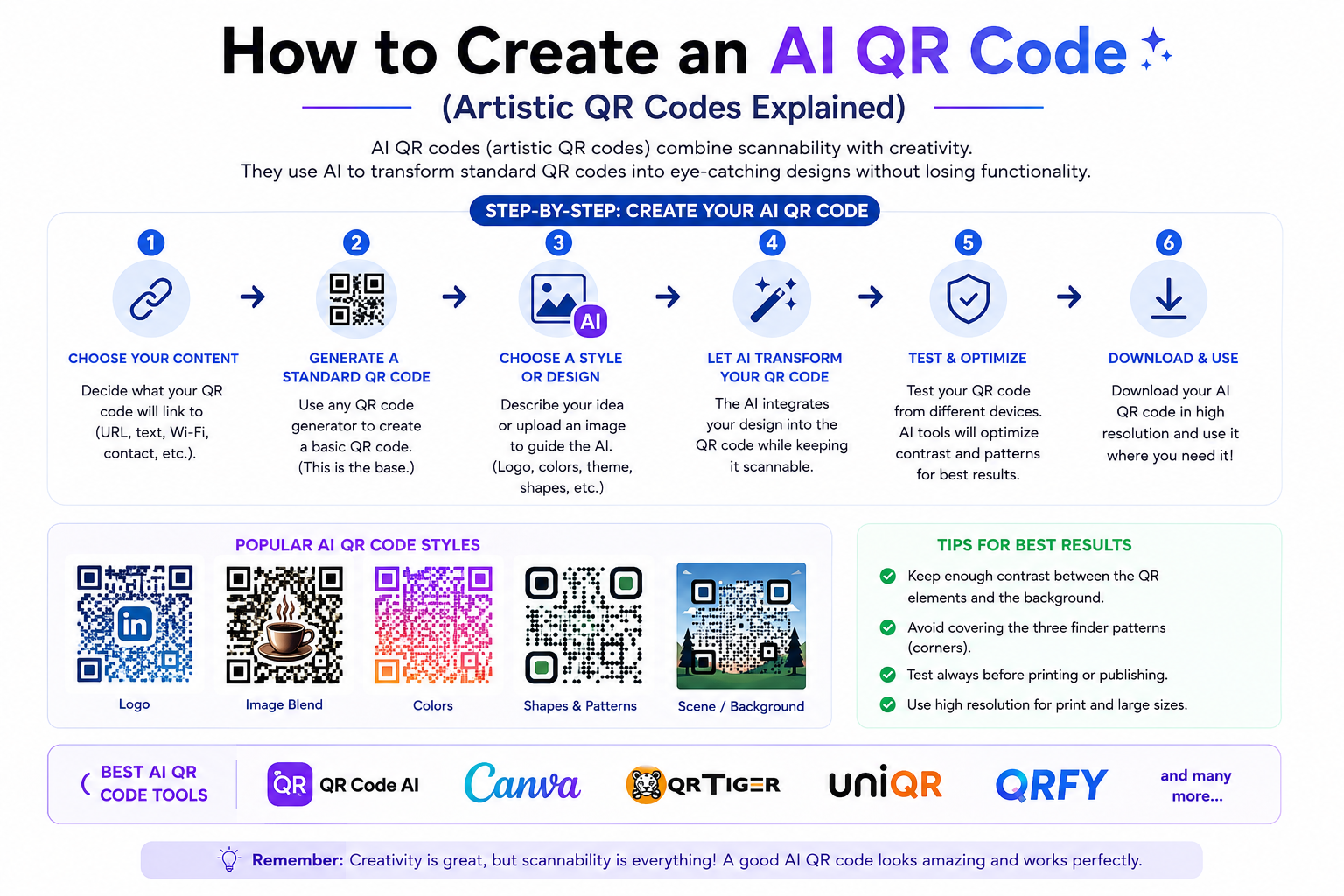
How to Create an AI QR Code (Artistic QR Codes Explained)
Created on 28 June, 2026 • qr code • 225 views • 10 minutes read
Learn how to create an AI QR code in minutes. Artistic QR codes explained — how the technology works, best use cases, common mistakes, and step-by-step guide.
A standard QR code does its job — but nobody stops to look at it. It's a black-and-white grid, and most people scan it without a second glance. An AI QR code is something different entirely: it looks like a piece of art — a landscape, a brand illustration, an abstract design — and when you point your phone at it, it works exactly like any other QR code. Same destination, same speed, but a scan rate that can be up to 40% higher simply because people are curious enough to try.
In this guide, you'll learn what AI QR codes are, how the technology behind them works, what you can use them for, and how to create one in minutes using Toolxa's free AI QR code generator.
What Is an AI QR Code?
An AI QR code is a fully scannable QR code whose visual appearance has been transformed by artificial intelligence into an artistic image. Instead of the standard black-and-white grid, the code looks like a photograph, an illustration, a painting, or a branded design — while still encoding your link or data and scanning correctly with any smartphone camera.
The key distinction from simply "customizing" a QR code (changing colors, adding a logo, rounding the corners) is that an AI QR code rebuilds the visual from scratch. The underlying data pattern is embedded within the artwork itself, not placed on top of it. The result is a QR code that looks nothing like a QR code at a glance — yet works perfectly when scanned.
Image suggestion: side-by-side comparison of a standard black-and-white QR code vs an AI-generated artistic QR code with a nature theme — alt text: "ai qr code artistic vs standard qr code"
How Does AI QR Code Technology Work?
The technology behind AI QR codes combines two AI systems working together: Stable Diffusion and ControlNet.
Stable Diffusion is a text-to-image AI model that generates detailed artwork from a text prompt. Give it a description — "a forest at sunset," "a cyberpunk cityscape," "a minimalist coffee cup" — and it produces a full image matching that description.
ControlNet acts as a constraint layer on top of Stable Diffusion. While the AI generates the artwork, ControlNet forces the image to maintain the high-contrast pattern that a QR scanner needs to read the code. It constantly checks that the dark and light areas of the image align with where the QR code's data modules need to be — ensuring the result is both beautiful and functional.
QR codes include built-in error correction of 7-30%, meaning a portion of the visual pattern can be altered without breaking scannability. ControlNet leverages this tolerance to maximize the artistic transformation while preserving the minimum data pattern needed for reliable scanning.
The result is an image that looks like art to the human eye — but is read as a valid QR code by any modern smartphone camera or scanning app.
Benefits of Using an AI QR Code
AI QR codes solve one of the oldest problems with QR adoption: people don't scan codes they don't notice.
- Higher scan rates. Artistic QR codes attract attention naturally. Studies show that AI-generated QR codes receive up to 40% more scans than standard black-and-white codes — simply because they look interesting rather than generic.
- Brand consistency. A standard QR code is the same regardless of which brand puts it there. An AI QR code can reflect your brand's colors, aesthetic, and personality, making it a visual asset rather than a utility element.
- Social media worthy. Standard QR codes are never shared voluntarily. An AI QR code that blends your link with a striking visual has a real chance of being photographed, posted, and shared — extending your reach organically.
- Memorable. A QR code that looks like a coffee cup on a café table, or a passport stamp design on travel packaging, sticks in the mind in a way a generic grid never will.
- Same functionality, zero tradeoffs. AI QR codes scan on any standard smartphone camera and work with any QR destination — URL, WiFi, vCard, payment link, or any other type.
How to Create an AI QR Code
Creating an AI QR code on Toolxa takes just a few minutes — no design skills or technical knowledge required.
Step 1: Choose Your QR Code Type and Destination
Before generating the artistic design, decide what your QR code should link to. Common choices include:
- A website URL or landing page
- A WhatsApp direct chat link
- A WiFi network
- A payment page
- A vCard contact
Enter your destination in Toolxa's AI QR Code Generator and select the appropriate QR type.
Step 2: Write Your AI Prompt
This is the creative step. Write a short text description of the visual style you want the AI to generate — the same way you'd describe an image to an illustrator:
- "A Japanese garden with cherry blossoms in soft pink tones"
- "A dark forest with glowing blue fireflies"
- "A minimalist geometric pattern in black and gold"
- "A coffee shop interior with warm lighting and wooden textures"
The more specific and visual your prompt, the better the result. Think about the mood, colors, setting, and style you want — and include any elements that connect to your brand or the context where the code will be displayed.
Step 3: Adjust the QR Visibility Setting
Most AI QR generators include a setting that controls how strongly the QR pattern is enforced within the image. A higher QR visibility setting produces a more reliable scan but a less artistic result. A lower setting produces a more striking image but risks reducing scannability.
For any code you plan to print or distribute, start with a higher visibility setting and test scannability before lowering it for a more artistic look.
Step 4: Generate, Test, and Download
Generate the code and scan it immediately with at least two phones — one iPhone and one Android — before downloading. If it doesn't scan reliably, regenerate with a higher QR visibility setting or adjust your prompt to include stronger light-dark contrast (for example, a bright sky against a dark landscape).
Once the code scans correctly, download it as a high-resolution PNG or SVG file ready for print or digital use.
What to Use AI QR Codes For
AI QR codes work best in contexts where visual impact matters — where a standard grid would be ignored but an interesting image would be noticed.
Marketing materials. Flyers, posters, and event banners with an AI QR code that matches the visual theme of the campaign attract far more scans than a generic code placed as an afterthought.
Product packaging. A QR code on packaging that blends with the product's visual identity — a floral design for a skincare brand, a circuit-board pattern for a tech product — feels intentional rather than utilitarian.
Restaurant menus and table cards. A QR code designed to look like food, a coffee cup, or the restaurant's interior theme turns a scan prompt into a conversation piece.
Business cards. A QR code on a business card that links to your portfolio or LinkedIn profile, designed to match your personal brand aesthetic, makes a lasting first impression.
Real estate listings. A property listing with a QR code that looks like an architectural illustration rather than a grid stands out at open houses and on printed flyers.
Social media content. An AI QR code that links to a landing page, product, or profile — designed to fit the visual style of the platform — can be shared directly as a piece of content.
Common Mistakes to Avoid
- Lowering QR visibility too far. The most common failure is prioritizing aesthetics over function. Always scan before printing. A beautiful code that doesn't scan is useless.
- Low contrast in the art style. QR scanners read brightness, not color. If your chosen art style has areas where dark and light are similar in brightness (even if different in color), the code may fail to scan. Styles with strong light-dark contrast — a bright sky over a dark landscape, white flowers on a dark background — work best.
- Printing at too small a size. AI QR codes need to be printed at a minimum of 1.5 × 1.5 inches (4 × 4 cm) to scan reliably, since the artistic elements make the pattern harder to read at very small sizes. For more on sizing, see our QR Code Size Guide.
- Scanning only on one device. Always test on both iOS and Android before committing to print — different camera apps handle artistic QR codes differently.
- Using a highly detailed or chaotic art style. Abstract or highly textured styles with no clear light and dark regions are the hardest for scanners to read. Start with styles that have clear structural contrast.
Best Practices
- Match the art style to the context. A luxury brand should use a clean, minimal style. A children's product should use bright, playful imagery. The AI QR code should feel like it belongs where it's placed.
- Use a Dynamic QR code as the base. A dynamic code lets you change the destination URL after printing — so if you ever need to update where the code sends people, you don't have to regenerate and reprint the artistic design. See our guide on Static vs Dynamic QR Codes for more detail.
- Test in real-world conditions. Scan the printed version (not just the digital file) under different lighting conditions — office light, outdoor sunlight, and low light — before deploying widely.
- Save the original high-resolution file. AI QR code generation is not always deterministic — you may not be able to recreate the exact same design later. Download and store the original file carefully.
- Include a subtle "Scan me" prompt. Even the most striking AI QR code benefits from a small label that tells viewers what to do. "Scan to visit," "Scan to connect," or "Scan to order" removes any ambiguity.
FAQs
Do AI QR codes scan on all phones?
Yes. AI QR codes encode data using the standard QR specification and are read by the same scanner apps and camera software as any other QR code. No special app is required — any modern smartphone camera handles them the same way it would a standard code. The artistic layer is purely visual.
Are AI QR codes less reliable than standard QR codes?
A well-generated AI QR code with the QR visibility setting calibrated correctly is highly reliable. The built-in error correction in QR codes (up to 30%) gives the AI room to apply artistic transformation without breaking scannability. That said, AI QR codes do require more careful testing before print deployment than a standard code.
Can I use an AI QR code for any destination?
Yes. The QR type and destination (URL, WiFi, vCard, payment link) are set before the AI generates the artistic design. The artistic transformation is applied on top of any QR content type.
Can I add my logo to an AI QR code?
Some AI QR generators support logo embedding within the artistic design. On Toolxa, you can generate an AI QR code and then layer your branding during the design step before downloading.
Do AI QR codes expire?
The AI QR code itself does not expire — but if it encodes a URL, that URL must remain live for the code to be useful. If you used a dynamic QR code as the base, you can update the destination at any time. See our guide on How Long Do QR Codes Last for a full breakdown.
Is an AI QR code free to create?
Yes. Toolxa's AI QR code generator is free to use with no sign-up required for basic generation.
Final Thoughts
AI QR codes are one of the most compelling upgrades available to anyone using QR codes for marketing, branding, or customer engagement. The underlying technology is sophisticated — Stable Diffusion and ControlNet working in tandem to produce artwork that is simultaneously a functional data carrier — but the experience of creating one is simple. Write a prompt, adjust a slider, test it, download it.
The result is a QR code that people actually notice, stop to look at, and scan out of genuine curiosity rather than obligation. In a world where standard QR codes have become visual noise, that curiosity is worth a great deal.
Ready to create yours? Use Toolxa's free AI QR code generator to turn any link into a piece of art — no design skills required.